VirtuaTilt Wiki › Activate your VirtuaTilt for VirtuaTilt Bridge
Activate your VirtuaTilt for VirtuaTilt Bridge
From firmware v8.0.26, VirtuaTilt Bridge recognises your cabinet by a certificate that 3DPTronics issues for it. You need this once, only if you use VirtuaTilt Bridge and your cabinet was bought before firmware v8.0.26. New cabinets leave 3DPTronics already activated.
NOTE: The activation is only for VirtuaTilt Bridge (Visual Pinball X on Meta Quest). Every other profile and game works as before, activated or not.
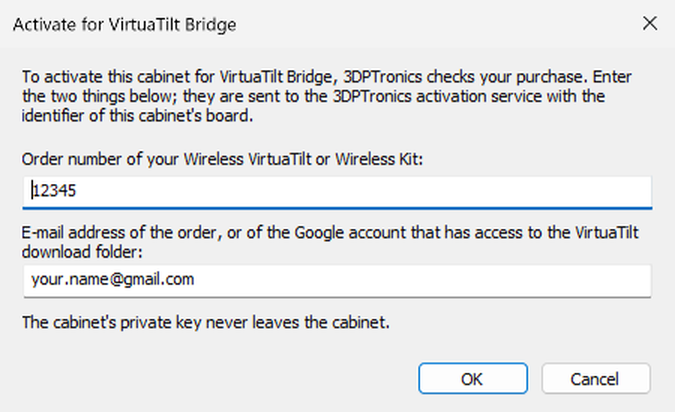
Have at hand: the order number of your Wireless VirtuaTilt (or of your Wireless Kit), and the e-mail address of that order, or of the Google account that has access to the VirtuaTilt download folder.
How to activate
- Update the VirtuaTilt to firmware v8.0.26 or later (see Appendix A: Firmware Update). To check it, open the GUIConfigTool of the v8.0.26 package: on the Overview tab the Pico and the ESP32 module must both show Firmware status: up to date.
- Connect the VirtuaTilt to the PC with the USB cable and open GUIConfigTool, the one of the firmware package you installed. On the Overview tab, find VirtuaTilt Bridge activation. If it says Activated, you are done.
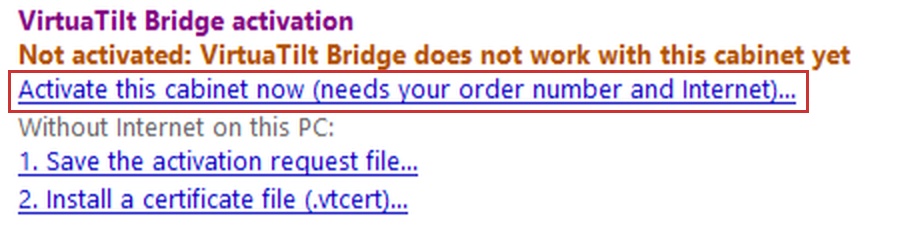
- If it says Not activated, click Activate this cabinet now:
- Enter the order number and the e-mail address, and click OK:
- The PC needs Internet. After a few seconds GUIConfigTool says that the cabinet is activated, and the section shows Activated with the serial of your cabinet:

That's it! Full Factory Reset and Delete Configuration Files (Device menu) do not remove the activation. Erase Entire Flash (Boot Loader Mode), or restoring a flash backup, does: then activate the cabinet again.
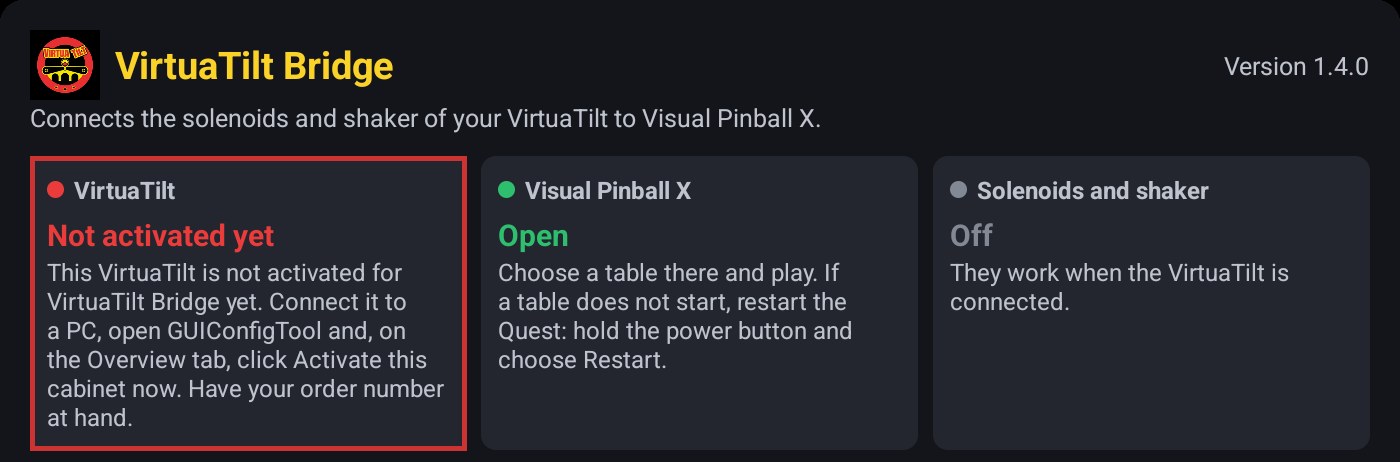
Until the cabinet is activated, VirtuaTilt Bridge says Not activated yet (with the USB cable: Found, but not usable, This VirtuaTilt is not activated for VirtuaTilt Bridge yet), and with the two VPX-Quest-DOF profiles the bumpers/slingshots solenoid and the shaker stay off. The flipper solenoids still kick with the flipper buttons, as in every profile. After the activation VirtuaTilt Bridge connects by itself in a few seconds: you don't need to turn the cabinet off and on.
What GUIConfigTool sends
GUIConfigTool sends to 3DPTronics the order number, the e-mail address, the identifier of your cabinet's board, the public key your cabinet made for itself and its firmware version: nothing else. One order activates one cabinet.
No Internet on that PC?
Click 1. Save the activation request file, take the file to a PC with Internet, and run this there:
ConfigTool --identity-activate-file <request file> <certificate.vtcert>
Then back on the first PC click 2. Install a certificate file. ConfigTool is in the redist folder, under tools/ConfigTool/.
Good to know
- If the Overview tab has no VirtuaTilt Bridge activation section, check that both chips have v8.0.26 and that you use the GUIConfigTool of that package. After a Full Factory Reset the cabinet has no profile: load one first.
- A flash backup made with GUIConfigTool does not hold the activation. If you restore one, activate the cabinet again.
- With the two VPX-Quest-DOF profiles, until the cabinet is activated, the Output Ports tab of GUIConfigTool does nothing. The Output Hardware tab works (see Output Ports Testers).
Messages and what to do
| Message | What to do |
|---|---|
| VirtuaTilt Bridge says “It needs firmware v8.0.26 or later” | Update the VirtuaTilt firmware. See Appendix A: Firmware Update. |
| VirtuaTilt Bridge says “Not activated yet”, or “This VirtuaTilt is not activated for VirtuaTilt Bridge yet” | Activate the cabinet with GUIConfigTool on your PC: the steps above. |
| VirtuaTilt Bridge says “Activation not valid”, or “The activation of this VirtuaTilt is no longer valid” | Contact 3DPTronics support. |
| VirtuaTilt Bridge says “Found, but not usable” | Do what the window says under it. Over Bluetooth, if it stays, remove the VirtuaTilt in the Quest's Bluetooth settings and pair it again (see Pairing Your VirtuaTilt with a Meta Quest), then press Set up in VirtuaTilt Bridge and restart the Quest. |
| Both chips have v8.0.26, but VirtuaTilt Bridge still asks for a firmware update, or over Bluetooth it stays on “Connecting...” | You still have an older VirtuaTilt Bridge: install 1.4.0 (its version is at the top right of its window). See Visual Pinball X on Meta Quest. |
| VirtuaTilt Bridge says “Not a VirtuaTilt”, or “It did not pass the VirtuaTilt check” | Check that both chips have v8.0.26 and that a Quest profile is loaded. If it still says so, contact 3DPTronics support. |
| GUIConfigTool says the order number and the e-mail address do not match a VirtuaTilt order | Use the order number of the cabinet (or of the Wireless Kit), not of another purchase, and the e-mail address of that order or of the Google account that has access to the VirtuaTilt download folder. If they are right, contact 3DPTronics support. |
| GUIConfigTool says “This order has already activated another VirtuaTilt” | Contact 3DPTronics support, for example if your order has more than one cabinet, or after the board of your cabinet was replaced. |
| GUIConfigTool says “The activation service could not be reached” | Check the Internet connection of the PC and try again. Without Internet, see No Internet on that PC? above. |
| GUIConfigTool says “This VirtuaTilt is already activated, but not with this order” | Contact 3DPTronics support. |
| GUIConfigTool says “Too many attempts” | Wait an hour and try again, or contact 3DPTronics support. |
| GUIConfigTool says “The cabinet has no free flash memory for the activation” | Do a Full Factory Reset (Device menu of GUIConfigTool), load your profiles again, then activate the cabinet. The Full Factory Reset erases the profiles and the settings stored on the cabinet. |
| Set up in VirtuaTilt Bridge says the VirtuaTilt has not passed the VirtuaTilt check | Look at the VirtuaTilt box of VirtuaTilt Bridge. If the cabinet is not activated, follow the steps above. When the box says Connected, press Set up again. |
The guide of VirtuaTilt Bridge and Visual Pinball X on the Meta Quest: Visual Pinball X on Meta Quest.
The interactive VirtuaTilt wiki adds an image-based 360-degree preview, a theme gallery and a built-in AI assistant — open the wiki.
Last updated: 2026-11-16
VirtuaTilt is designed and manufactured by 3DPTronics — see the Wireless VirtuaTilt controller. Diagnose your own cabinet with the free VirtuaTilt extension for Claude.