VirtuaTilt Wiki › Adjusting Solenoid Strength
Adjusting Solenoid Strength
Your Wireless VirtuaTilt lets you fine-tune the strength of the left and right flipper solenoids to match your personal preference and the feel of your cabinet.
In the Configuration tab of GUIConfigTool, scroll to the outputs section and modify the values for "Left Flipper Solenoid" and "Right Flipper Solenoid":
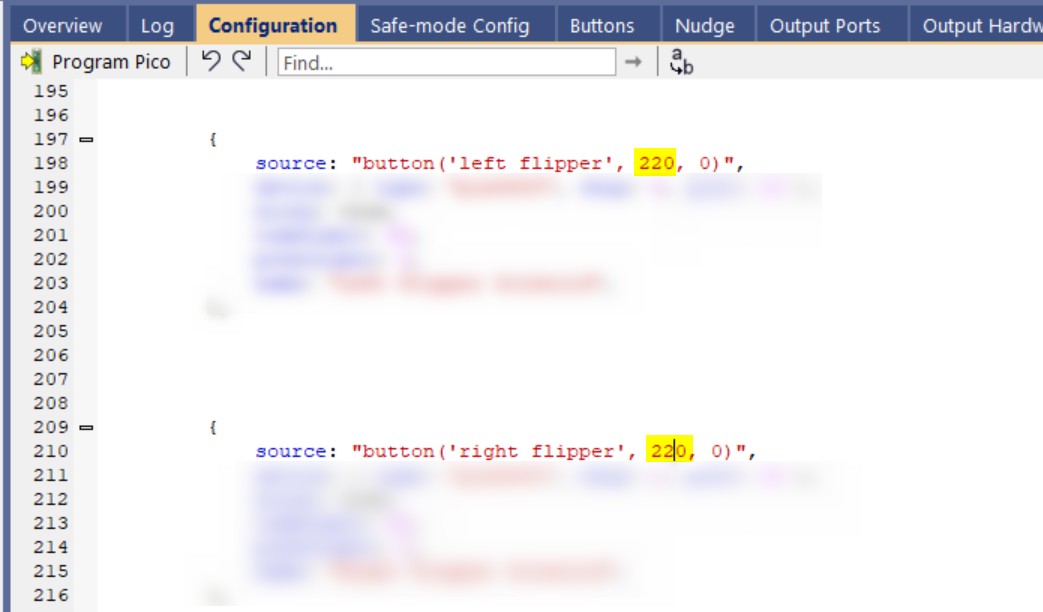
Suggested range is 200 as min and 255 as max After modifying, click "Program Pico" and confirm.
NOTE: It is perfectly safe to try values outside the suggested range. Zero is the minimum and 255 is the maximum, and built-in protective timers prevent overheating no matter what value you pick. However, below 200 the flipper kick is barely noticeable. If you want the cabinet completely silent, set both flipper solenoid values and the shaker motor cap (see next chapter) to 0.
The interactive VirtuaTilt wiki adds a 3D model, a theme gallery and a built-in AI assistant — open the wiki.
Last updated: 2026-10-28
VirtuaTilt is designed and manufactured by 3DPTronics — see the Wireless VirtuaTilt controller. Diagnose your own cabinet with the free VirtuaTilt extension for Claude.