VirtuaTilt Wiki › Exiting Xbox-Exclusive USB Mode (Reset Button)
Exiting Xbox-Exclusive USB Mode (Reset Button)
A small group of USB profiles configure the cabinet to enumerate as a REAL Microsoft Xbox 360 controller.
This Xbox-exclusive mode has one big advantage and one important caveat:
Advantage: Steam, Xbox-PC games, console emulators, and anything that natively recognises an Xbox controller will see the cabinet immediately, with no driver setup, no manual XInput registration, and no Steam Big Picture configuration.
Caveat: Windows hides the Pinscape Pico console interface while this profile is active, because Windows treats the cabinet purely as a game controller (USB HID Game Controller class), not as a configurable device. As a result, GUIConfigTool CANNOT see the cabinet while this profile is loaded — you cannot push a different profile, update firmware, or change calibration through the normal USB connection.
How to get back out of Xbox-exclusive mode
To leave Xbox-exclusive mode, use the Reset button of the profile:
- Press AND HOLD the Blue button for 2 seconds. In these profiles the Blue button is the Reset button and has no other function.
- The cabinet restarts in Factory Mode: it ignores the stored profiles until it is switched off, so Windows shows it as a normal Pinscape Pico device again and GUIConfigTool can connect.
- Within ~5 seconds GUIConfigTool sees the cabinet. Load the profile you want next — as the default (Configuration tab → File → Import from File → Program Pico) or in a slot (Profiles tab; see the Loading a Profile chapter).
NOTE: Factory Mode does not delete the stored profile. If you switch the cabinet off without loading another profile, the next power-on loads the Xbox-exclusive profile again.
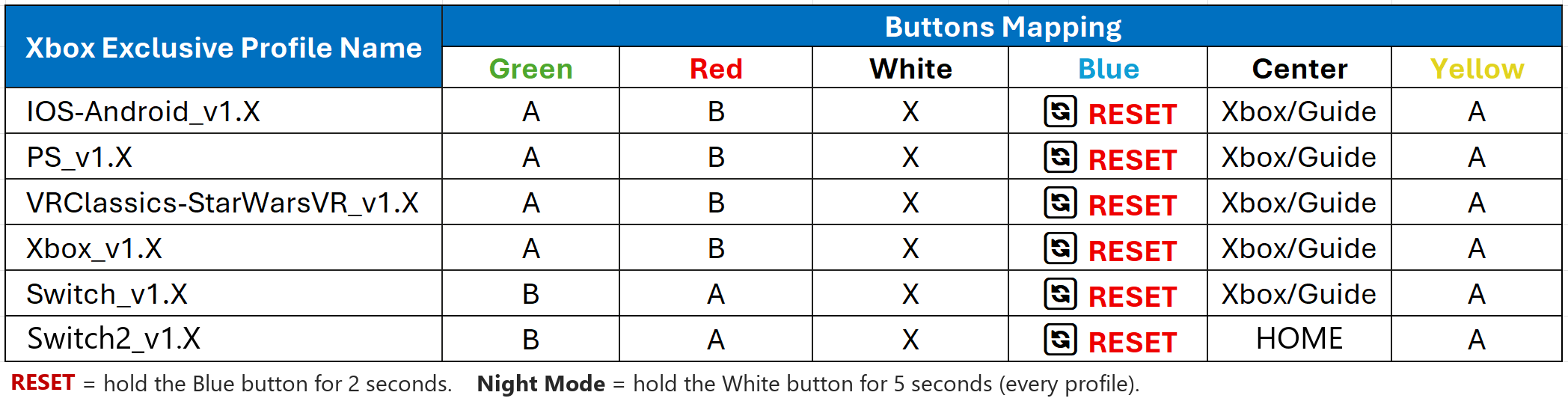
🔄 RESET = factory-reset action (hold for 2 s). In every profile of this table the Blue button is the RESET button. Night Mode stays on the White button (hold 5 seconds), as in every other profile.
NOTE: In the older Switch_v1.1 profile the RESET is on the White button, the same button as Night Mode, so Night Mode cannot be used there. Load Switch_v1.2 or later.
From firmware v8.0.18 you can also leave this mode without a reset: hold the joystick DOWN together with the button of a slot that holds a non-console profile for 3 seconds (see "Switching Profiles Without Powering Off"). This does not work with the Blue button's slot, because its 2-second reset fires first.
NOTE: The factory-reset action only fires when the button is held for the full 2 seconds. Short presses do nothing — the button does not have a normal gameplay function in the Xbox profile. This deliberate hold-time prevents accidental resets during gameplay.
NOTE: Other USB profiles (STEAM-XInput, Future Pinball, VPX, etc.) keep the Pinscape console visible to Windows, so they do NOT need the reset-button trick — you can switch between those profiles freely with GUIConfigTool. The reset-button procedure is required only for the profiles that hardcode the Xbox controller in the JSON usb block.
NOTE: All Bluetooth profiles keep the Pico USB console fully accessible, so the reset-button procedure is never needed for Bluetooth profiles.
The interactive VirtuaTilt wiki adds a 3D model, a theme gallery and a built-in AI assistant — open the wiki.
Last updated: 2026-10-28
VirtuaTilt is designed and manufactured by 3DPTronics — see the Wireless VirtuaTilt controller. Diagnose your own cabinet with the free VirtuaTilt extension for Claude.