VirtuaTilt Wiki › Using Your VirtuaTilt over USB (Wired Mode)
Using Your VirtuaTilt over USB (Wired Mode)
⚠ DOF / DOFLinx setup & configuration are out of scope for 3DPTronics support. VirtuaTilt is 100% compatible with them, but our help is limited to what these written guides already cover — we cannot create, debug, or tune DOF / DOFLinx configs for you. Virtual pinball has a steep learning curve; please study the guides and lean on each project's own documentation and community. We value your feedback and help where we can, but we cannot go further than the guides.
Setting up DOF or DOFLinx? Let it read your setup.
VirtuaTilt for Claude is a free extension that reads your configuration — your profiles, your DOF, your DOFLinx — and helps you set them up for your VirtuaTilt: it names the file and the line that is wrong, instead of listing what is usually wrong. Needs Windows and Claude Desktop, and a VirtuaTilt you already own. Beta. virtuatilt.com/install
⚠ Visual Pinball X — use the stable 10.8.0. VPX 10.8.1 and newer are beta / pre-release builds that still have bugs. We recommend you install and stick with the stable VPX 10.8.0. Running 10.8.1+ is not recommended at the moment. Known VPX bugs are tracked on the official issue list: github.com/vpinball/vpinball/issues.
Your Wireless VirtuaTilt is ALSO a fully-featured USB cabinet. The Pico USB connection is always available, exactly like the original (non-wireless) VirtuaTilt — just plug the Pico USB cable into your PC and the cabinet is recognized as a Pinscape Pico device.
You can use either mode at any time:
USB — for Windows desktop play (Visual Pinball X, Future Pinball, Steam pinball games, iOS/Android, etc.). Direct cable connection, lowest latency, all DOF/DOFLinx feedback features available.
Bluetooth — for Meta Quest VR play / PC play or wherever you do not want a cable. No host-side driver setup beyond a one-time Bluetooth pairing. DOF / DOFLinx feedback over Bluetooth needs the two DOF profiles and the Bluetooth DirectOutput.dll (see DOF / DOFLinx over Bluetooth).
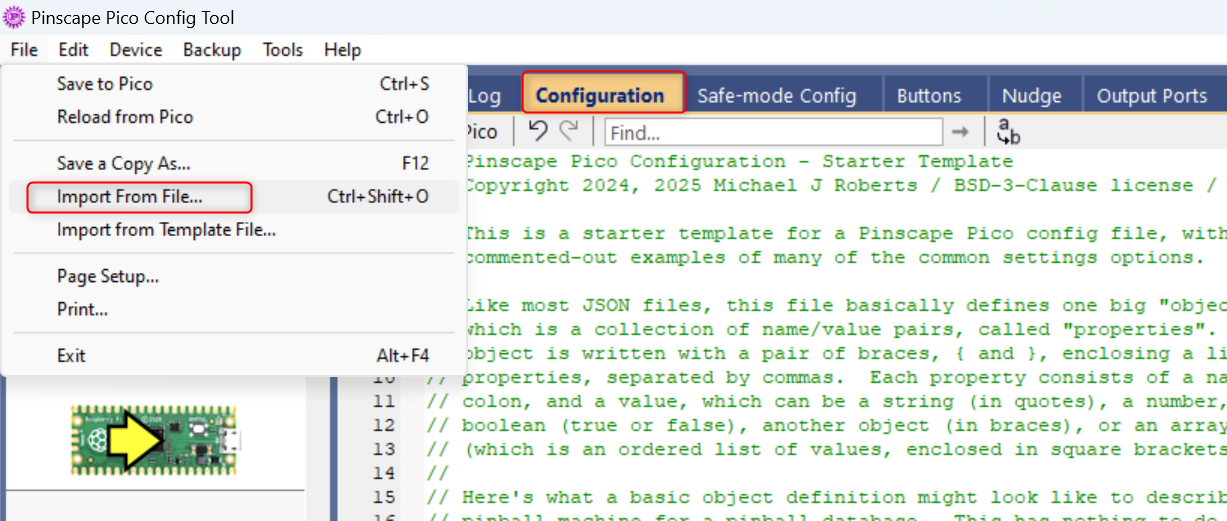
Both modes share the same cabinet hardware — switching is just a matter of loading a different profile via GUIConfigTool. USB profiles are loaded the same way as Bluetooth profiles. Loading a profile via Configuration tab → File → Import from File → Load the .json file → Program Pico sets the default profile (the one that boots when no button is held). The other profiles are assigned to the boot buttons in the Profiles tab — to run one of those, just hold its button while the cabinet powers on (see the Loading a Profile chapter for the Configuration-tab vs Profiles-tab details).
USB profiles
VTConfig-USB-VPX-10.8.X-DOF_v1.X.json— Visual Pinball X (DOF feedback).VTConfig-USB-VPX-NODOF_v1.X.json— Visual Pinball X without DOF. Every control is a gamepad button: assign them in VPX (table in Default Buttons Mapping).VTConfig-USB-FuturePinball-DOF_v1.X.json— Future Pinball (DOF feedback).VTConfig-USB-FuturePinball-NODOF_v1.X.json— Future Pinball without DOF.VTConfig-USB-PinballFX-DOFLinx_v1.X.json— Pinball FX (DOFLinx feedback).VTConfig-USB-PinballFX_v1.X.json— Pinball FX (without DOFLinx).VTConfig-USB-FX3-DOFLinx_v1.X.json— Pinball FX3 (DOFLinx feedback).VTConfig-USB-STEAM-XInput_v1.X.json— Steam games as an Xbox controller (see "Xbox Drivers Installation").VTConfig-USB-ZaccariaPinball_v1.X.json— Zaccaria Pinball. From v1.2 the bumpers/slingshots solenoid follows the game's own rumble.VTConfig-USB-Xbox_v1.X.json— Pure Xbox 360 controller.VTConfig-USB-PS_v1.X.json— PlayStation-style gamepad.VTConfig-USB-Switch_v1.X.json— Nintendo Switch-style controller. To plug straight into a Switch 2 or a Switch, use the Switch2 profile below.VTConfig-USB-Switch2_v1.X.json— New: Nintendo Switch 2 over a single USB cable, no adapter; it also works on the first Switch (see "Nintendo Switch 2 over USB").VTConfig-USB-IOS-Android_v1.X.json— iOS / Android over USB-OTG.VTConfig-USB-FXVR_XAM_v1.X.json— Pinball FX VR on Meta Quest, XAM. v1.2 supports the two-stage flippers of Pinball FX VR 1.10.VTConfig-USB-FXVR-Analog_v1.X.json— New: Pinball FX VR on Meta Quest as a USB gamepad with analog nudge. Set Pinball FX VR to Normal mode.VTConfig-USB-VRClassics-StarWarsVR_v1.X.json— Pinball VR Classics and Star Wars Pinball VR on Meta Quest.
NOTE: Switching between USB and Bluetooth is symmetric. If you currently have a BT profile loaded and want to use USB, simply load a USB profile via GUIConfigTool. The Pico-USB connection is always available, even while a BT profile is active, because GUIConfigTool talks to the Pinscape Pico over a separate HID interface.
NOTE: The bundled redist folder contains both BT profiles and USB profiles.
The interactive VirtuaTilt wiki adds a 3D model, a theme gallery and a built-in AI assistant — open the wiki.
Last updated: 2026-10-28
VirtuaTilt is designed and manufactured by 3DPTronics — see the Wireless VirtuaTilt controller. Diagnose your own cabinet with the free VirtuaTilt extension for Claude.